How do a staff request for laptop
Introduction
HRMS is an indigenous application which helps the Organization to accumulate and maintain the Human Resource data. This document describes how a staff can submit a request for Laptop.
Getting Started:
Access Human Resource Management System
Open an internet browser (Recommended to use Google Chrome)
Type https://my.amrita.edu/ and click enter
Login with your amrita email id and password.
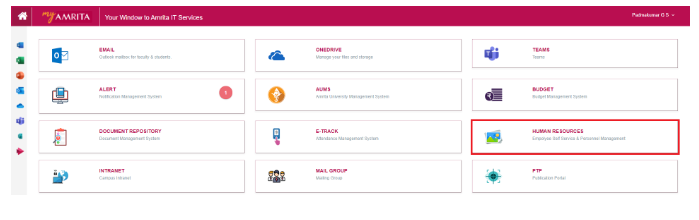
Click HUMAN RESOURCES.
Laptop Request:
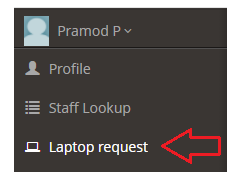
Click on the Laptop request at the left side menu to load the Request form page
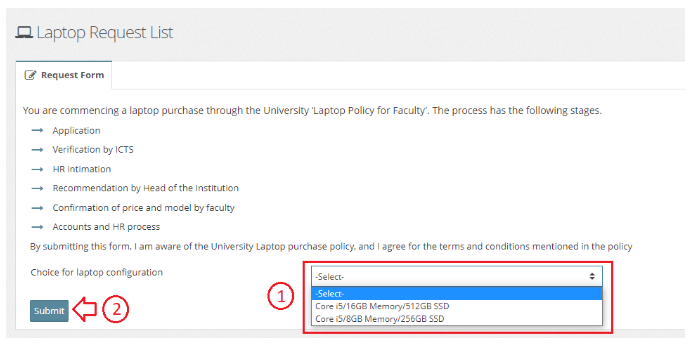
Read all instructions regarding the policies and different stages of laptop purchase through the university before submitting the request form
Select one of the laptop configuration from the drop-down list
Click Submit button to submit the request form
Now you have submitted your request form for laptop. This request needs to get pass through few stages of approval.
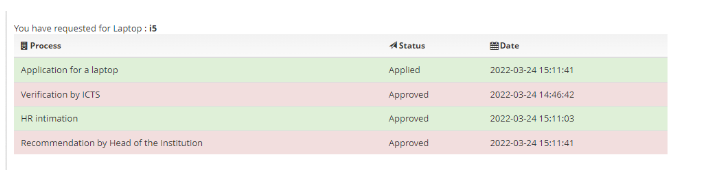
Status of the application for the laptop will be displayed once processsing starts.
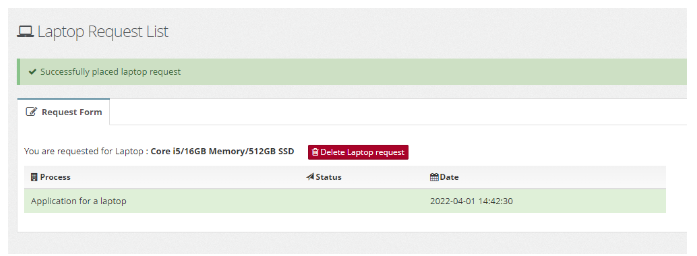
User can delete the request if required before the request gets start processing or the concern department approves.
Stages of approval can be view as displayed in the below image.